I've been having this problem with memory card getting unmounted. It seems that after a power down, or a night on charger it just "forgets" to mount the card. Not much on the internet so I'll continue investigating, it gets really annoying though.
I was hoping to get the update to 2.2 (unofficial of course cause Motorola doesn't care about it's European customers. I swear never to buy anything from this company.) not sure now... Maybe it's a OS version problem?
Will try updating this weekend.
Wednesday, 22 December 2010
Friday, 20 August 2010
Too weak... Or in search for a replacement laptop.
I love my laptop. Told you that before. That's why it's so hard to admit for me that it's old and slowly becoming to weak for what I'd like to do. Not to mention that KDE v. 4 is eating it's memory like fresh bread.
Time to look around.
Get list of models that fit above parameters:
All of them have
Price: all within range, now on offer for £499.97
SATELLITE L630 SERIES seem to fit my needs best.
Step four:
Draw some conclusions and adjust my expectations:
As it seems my criteria, even though I thought I'm pretty low speccing them, are not met by any of the models available.
Also it's quite hard to start looking if you do not know what's in store when it comes to processor power. See my note about that Atom processor above? It's supposedly 1.6GHz, but in reality it's not comparable that way to a normal desktop processor.
And as this is THE MOST IMPORTANT reason why I'm willing to change my old toy for a new one I have to be very picky.
So, let's first take a look at who's left, excluding only those companies, who have nothing to offer at all, or are way too expensive:
Intel® Core™ 2 Duo SU9400 / 1.4 GHz (Acer)
Intel® Core™ 2 Duo SU7300 (Asus, Fujitsu)
AMD Athlon II Neo K125 (Dell)
AMD Turion II Neo K625 (Dell)
Intel® Pentium® Processor SU4100 (Fujitsu, Toshiba, Samsung)
Intel® Celeron® Processor 743 (Fujitsu)
Intel® Core™ i3-350M (Toshiba)
Intel® Pentium® processor P6000 (Toshiba)
Intel® Pentium® Processor SU2700 (Toshiba)
I'm not going to go into details of every CPU. I'll just go easy way and benchmark them. http://www.cpubenchmark.net/cpu_list.php is showing results for almost every one. Let's see how they compare:
My old Latitude's Passmark CPU Mark was... 292 :)
Theoretically then even the lowest specced from the above would be 100% more power, but... I want to use it in the future. Possibly for as long as I've used the little one. And seeing the gap between the first two and the rest, that leaves me with Toshiba only.
Weight is another factor that bothered me, as this is going to be a "portable device" so it has to be light, but it seems, normal laptops don't come in what my old one had, unless those are netbooks and that is totally out of question. I'll have to settle for a bit more than 1.5kg.
Step five:
Lets compare what Toshiba has (just the differences).
My "simple colouring method" ;) shows that for 50 quid extra I'll get better processor, less HDD space, more memory to start with (although as max expandable is the same for both models it's not that important).
Come to think of it, 320 GB hard drive is enough for me, as I store all my files, music, videos and works on an external netdrive anyway. So I'm not that fussed about getting smaller drive.
Step six:
final thoughts about the model:
Looks.
It's pretty much your average nice looking black laptop. Nothing very exciting about it, but then again it's not the most important factor. Full-size flat keyboard on the other hand is nice.
OS:
Not important for me, as I'm going to install Linux on it anyway, but I suppose for an average user it's cool to have newest Windows on board.
Display:
LED one. Resolution 1366x768 which is a standard today.
Graphics:
Intel HM55 Express Chipset with Intel Graphics Media Accelerator HD
Supports HD, has Blu-ray support
It is a pretty solid chipset, adting Jan 2010, so hopes for good in this field as well.
Sound system:
Supported audio format: 24-bit stereo, built-in stereo speakers.
Manufactured by Toshiba Bass Enhanced Sound System with Dolby Advanced Audio.
OK for this little one. Not like I'm going to use use it to listen to my music a lot ;)
Battery:
Maximum life: up to 4h50min. That is something that bothers me a bit, as it's exactly the same time my little one had. It's still ok for short plane flights or train trips.
Weight:
2.10 kg
Not the lightest... True. And I don't like it. It's almost 2 times heavier than my Latitude. But looking around, only the poor specced ones are around 1.5kg, all other reaching 2.
I'll have to think about it... What do you think?
Time to look around.
Step one:
List of major laptop manufacturers I would be interested in, no presumptions made at this stage:- Acer
- Apple
- ASUS
- Compaq
- Dell
- Fujitsu
- Gateway
- Hewlett-Packard
- Lenovo
- Panasonic
- Samsung Electronics
- Sony
- Toshiba
Step two:
Get rough expectations based on the old model:- screen size: ideally like my old box, 12.1-inch. (not smaller than 11, but not bigger than 13.3)
- resolution: minimum 1280 x 768
- processor: definitely more powerful than 1.1 GHz ideally more than 1.3 GHz
- HDD: more than 120GB
- all of the usual conectivity options (Bluetooth, WiFi, USB2 etc.)
- weight: ideally not more than 1.5kg
- battery time: minimum 5hrs.
- no netbooks, I actually want something I can run some lower specced games on.
- price: tough decision. I don't want to spend too much as this is going to be my backup machine. Let's say I'm willing to pay less than I've paid for my little one back then, which is below £860. After all laptops get more and more popular, thay should be cheaper. So... Let's aim at £600.
Get list of models that fit above parameters:
- Acer
All of them have
| Display Resolution | 1366 x 768 pixels |
| Display brightness | 200 cd/m2 |
| Display diagonal | 13.3 " |
| Display | WXGA TFT LCD one has: HD LED TFT LCD |
| Aspect Ratio | 16:9 |
| Number of colours | 16.7 |
Resolution and screen: fine
Four models only with 1.4GHz CPUs
All of those have HDDs and networking standards meeting my criteria.
Battery time between 8 and 9 hrs. Tick.
Weight.... All above 1.5kg. not much, but still. 1.6 to 1.65kg
Price: all within range, now on offer for £499.97
- Apple
- ASUS
Display 13.3" HD TFT (1366x768, Color-Shine, LED)
Weight: 1.50 kg
all, other criteria met except:
CPU: 1.3GHz. fail. (It is still fairly ok, so let's see..)
- Compaq
Two 11.6" models, both slightly below 1.5kg.
Prices look very promising too, more in the field of netbooks. Why?
CPU: 1.6 GHz but it's and Intel® Atom™ Processor :(
- Dell
LCD Display 13.3" (34 cm) HD WLED True-Life (1366x768)
CPU: Dual Core: Turion II Neo K625 (well benchmarks are actually quite good for this one)
Weight: 1.78 kg (awww)
Battery time: 5hrs
- Fujitsu
11.6-inch LED HD display
500 GB hard disk
Weight: 1.49 kg
Battery life: up to 6 hours
CPU: 1.3GHz
- Gateway
CPU: Intel® Core™ i7-620M !!! that is a 2.66GHz sweetness.
Display: 13.3" HD 1366 x 768 pixel resolution, LED-backlit TFT LCD
HDD: lots to chose from
Battery time 8hrs, networking fine too.
Weight: 2.1kg (not good, but it's with a bigger battery than the other mentioned models)
One problem stays though: Where do I buy one?! I can't seem to find them online in any shops!
- Hewlett-Packard
- Lenovo
- Panasonic
- Samsung Electronics
Processor: Intel® Pentium Processor ULV SU4100 (1.30GHz, 800MHz, 1MB)
Display: LCD 11.6" LED HD (1366 x 768) 16:9 Gloss
HDD: 250GB
No Bluetooth!!!
Weight (kg) 1.36kg
- Sony
All VAIO models from series Y and Z too expensive for my needs.
- Toshiba
SATELLITE L630 SERIES seem to fit my needs best.
CPUs 1.86 GHz to 2.26 GHz
Hard disks 320 GB or 500 GB
Display 33.8cm (13.3") | Toshiba TruBrite® HD TFT High Brightness display with 16 : 9 aspect ratio and LED backlighting
battery : up to 4h50min
weight : starting at 2.10 kg
Step four:
Draw some conclusions and adjust my expectations:
As it seems my criteria, even though I thought I'm pretty low speccing them, are not met by any of the models available.
Also it's quite hard to start looking if you do not know what's in store when it comes to processor power. See my note about that Atom processor above? It's supposedly 1.6GHz, but in reality it's not comparable that way to a normal desktop processor.
And as this is THE MOST IMPORTANT reason why I'm willing to change my old toy for a new one I have to be very picky.
So, let's first take a look at who's left, excluding only those companies, who have nothing to offer at all, or are way too expensive:
- Acer
- ASUS
- Compaq
- Dell
- Fujitsu
- Samsung Electronics
- Toshiba
Intel® Core™ 2 Duo SU9400 / 1.4 GHz (Acer)
Intel® Core™ 2 Duo SU7300 (Asus, Fujitsu)
AMD Athlon II Neo K125 (Dell)
AMD Turion II Neo K625 (Dell)
Intel® Pentium® Processor SU4100 (Fujitsu, Toshiba, Samsung)
Intel® Celeron® Processor 743 (Fujitsu)
Intel® Core™ i3-350M (Toshiba)
Intel® Pentium® processor P6000 (Toshiba)
Intel® Pentium® Processor SU2700 (Toshiba)
I'm not going to go into details of every CPU. I'll just go easy way and benchmark them. http://www.cpubenchmark.net/cpu_list.php is showing results for almost every one. Let's see how they compare:
| 2074 | Intel® Core™ i3-350M |
| 1486 | Intel® Pentium® processor P6000 |
| 959 | Intel® Core™ 2 Duo SU9400 |
| 954 | AMD Turion II Neo K625 |
| 890 | Intel® Core™ 2 Duo SU7300 |
| 840 | Intel® Pentium® Processor SU4100 |
| 521 | AMD Athlon II Neo K125 |
| 481 | Intel® Celeron® Processor 743 |
| 446 | Intel® Pentium® Processor SU2700 |
My old Latitude's Passmark CPU Mark was... 292 :)
Theoretically then even the lowest specced from the above would be 100% more power, but... I want to use it in the future. Possibly for as long as I've used the little one. And seeing the gap between the first two and the rest, that leaves me with Toshiba only.
Weight is another factor that bothered me, as this is going to be a "portable device" so it has to be light, but it seems, normal laptops don't come in what my old one had, unless those are netbooks and that is totally out of question. I'll have to settle for a bit more than 1.5kg.
Step five:
Lets compare what Toshiba has (just the differences).
| Satellite L630-130 | Satellite L630-13M |
|---|---|
Price £ 599.00 | Price £ 549.00 |
Processor Intel® Core™ i3-350M Processor | clock speed : 2.26 GHz | Front Side Bus : 1,066 MHz | 2nd level cache : 3 MB | 3rd level cache : 3 MB | Processor Intel® Pentium® processor P6000 | clock speed : 1.86 GHz | Front Side Bus : 1,066 MHz | 2nd level cache : 3 MB | 3rd level cache : 3 MB |
System memory 4,096 (2,048 + 2,048) MB | maximum expandability : 8,192 MB | technology : DDR3 RAM (1,066 MHz) | System memory 3,072 (2,048 + 1,024) MB | maximum expandability : 8,192 MB | technology : DDR3 RAM (1,066 MHz) |
Hard disk 320 GB | Hard disk 500 GB |
My "simple colouring method" ;) shows that for 50 quid extra I'll get better processor, less HDD space, more memory to start with (although as max expandable is the same for both models it's not that important).
Come to think of it, 320 GB hard drive is enough for me, as I store all my files, music, videos and works on an external netdrive anyway. So I'm not that fussed about getting smaller drive.
Step six:
final thoughts about the model:
Looks.
It's pretty much your average nice looking black laptop. Nothing very exciting about it, but then again it's not the most important factor. Full-size flat keyboard on the other hand is nice.
OS:
Not important for me, as I'm going to install Linux on it anyway, but I suppose for an average user it's cool to have newest Windows on board.
Display:
LED one. Resolution 1366x768 which is a standard today.
Graphics:
Intel HM55 Express Chipset with Intel Graphics Media Accelerator HD
Supports HD, has Blu-ray support
It is a pretty solid chipset, adting Jan 2010, so hopes for good in this field as well.
Sound system:
Supported audio format: 24-bit stereo, built-in stereo speakers.
Manufactured by Toshiba Bass Enhanced Sound System with Dolby Advanced Audio.
OK for this little one. Not like I'm going to use use it to listen to my music a lot ;)
Battery:
Maximum life: up to 4h50min. That is something that bothers me a bit, as it's exactly the same time my little one had. It's still ok for short plane flights or train trips.
Weight:
2.10 kg
Not the lightest... True. And I don't like it. It's almost 2 times heavier than my Latitude. But looking around, only the poor specced ones are around 1.5kg, all other reaching 2.
I'll have to think about it... What do you think?

Tuesday, 29 June 2010
Composition is the key
Making photos in the era of cheap digital cameras seems to be the domain of everyone.
Have you ever wondered why do some people make really good pictures, while others given better camera, the same topic, better light and other advantages never manage to get close to good, not to mention perfect?
Rule one: It is the human who's making photos, not the camera, so no matter how good your gear is, photos made with it without thinking will never be as good as the ones made with taking some time and thought.
Rule two: Cameras see world differently than we do. They do not think, so it's up to you to make the photo carry a message. In other words: Get to know what are you shooting before pressing the button.
Rule three: Composition is the key.
And that brings me to the point I've been thinking about lately. There are many very good manuals about composition in photography. What I wanted to do here is give some examples and sum up the most basic rules.
Images are generally:
Lines - Most often not real contours, but lines made by your eye and brain.
Colours - Less important in black and white photography, in colour one it's considered the main mood builder
Lights and Shadows - Often more important in BW photos, those are equally important in colour photos as colour itself.
These elements build space, textures and forms. And it was noticed long time before that humans generally find some arrangements of those more dynamic, while others are considered more static. Some images can be disturbing without even containing any really odd elements.
1. Open and Closed composition.
An example of an open composition is such, that gives the viewer this gut feeling that there's more to see, something is maybe hidden, or not entirely visible or simply unfinished. Open compositions can be both relaxing (seaside) and disturbing (an old bridge cut in two)
Closed composition on the other hand is a finished or enclosed item being the topic the of image. Also in this case it depends on the item itself, be it a running human or a sole tree, to be the main carrier of the mood.
As you will see in the examples there's more to it, than just dry definitions.
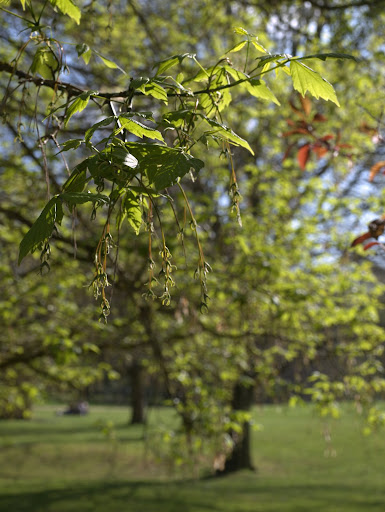
This is a closed composition, even though the branch is cut off and there's more in the background. The main topic however (the bunch of leaves on top of the twig) is "finished" and background is just forming blurred canvas.
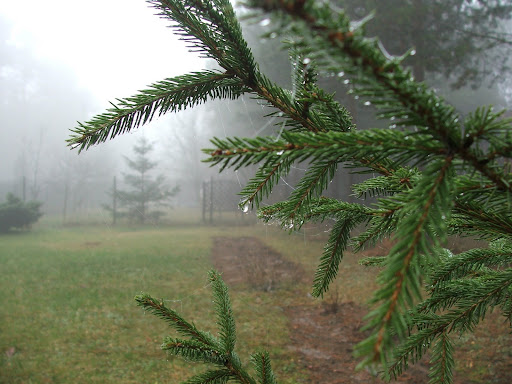
Branch again, and blurred background, yet this is an open composition, cause there's something in the back, and who knows maybe it is even more important than the wet greens in front? Such photos leave your imagination a bit to ponder upon.
2. Dynamic and static compositions
One could think that dynamic compositions are those of sports events and static are lakes and buildings. Nothing more misleading!
Long time ago some wise people have found out, that straight horizontal or vertical lines feel more stable, while diagonal, or askew images feel dynamic. Delicate curves create the feel of soft movement. In other words you can get a dynamic composition photographing the tree in your garden and a static one portraying children in the playground.
3. Example composition techniques and common rules
Of course there's more but keeping to these can help making your photos better.
Rule one: Image should have some point of interest, otherwise it's turning into a mixed up carpet-like pattern.
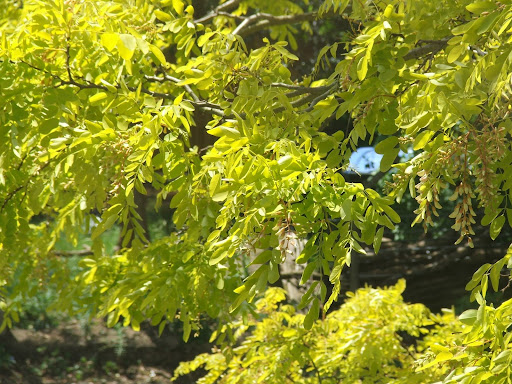
Pretty leaves, but what is this photo about exactly? Dullness?
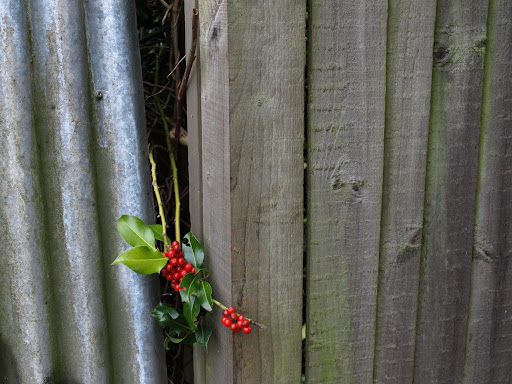
Ugly planks yet this one is much more interesting even though it's far from pretty or perfect.
Rule two: Watch out for clutter. Your brain is able to simply omit people to the side of picturesque tree or a car in front of an antique entrance to some museum. Your pictures will show them all.
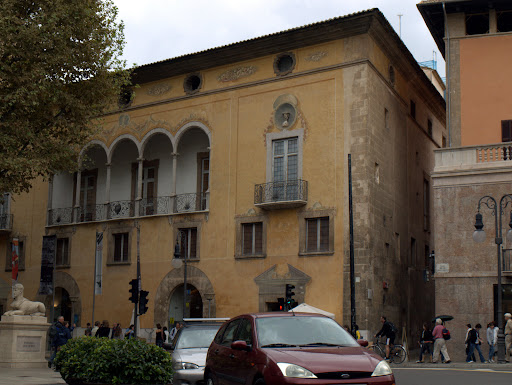
Wow, a Ford in the first plane. Not really the topic of the photo, but you can't fail to notice it...
Rule three: Bisections are evil. Unless you want to emphasize symmetry (or stunning lack of it).
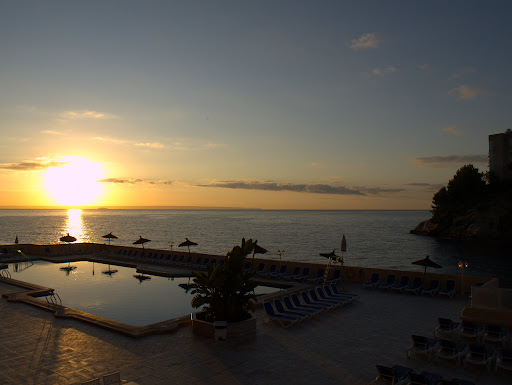
Right... This is not about the sunset, as the sun is too far to the left. Nor about the stunning sky, cause we see too much of the swimming pool. And the pool itself is not pretty enough (or lit enough for that matter) to make it an excuse for this shot.
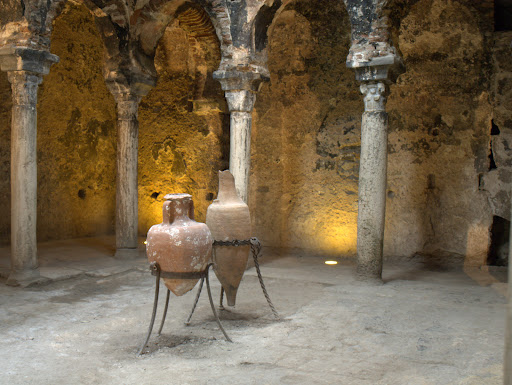
Everything is slightly off the middle making this photo a much interesting image.
As you see all rules have exceptions, but unless you know what you're doing (being a seasoned photographer) avoid them.
None of the above photos are exactly perfect. The purpose of this "manual" is to show pictures such as everyone has on their hard drives, Hence no really stunning master-works. Also all of them are mine :P
Now to the point. Most common techniques:
Rule of thirds - So easy and so popular almost every camera today has the ability to display an overlay grid for you while shooting.
The idea is simple: Divide your image in 3 horizontal and 3 vertical columns and place point of interests, mood changers on the lines or intersections of lines making columns(called strong points).

horizontally: pavement in the bottom part, sky in the upper one, middle is for buildings.
vertically: left: brighter part, right: dark part.
point of interest: lantern on the intersections of the upper and right columns.
Rule of odds
Essentially this rule suggests that an odd number of subjects in an image is more interesting than an even number. The other interesting point made by this rule is that an object surrounded by an even number of equal objects (person in the centre with two other persons to the side) creates a visual feeling of comfort, while the same object in solitude is considered disturbing (a lonely tree in the field).
Golden ratio
Maths apart (you can read about it here), this is one of the oldest composition rules, for centuries considered the perfect way of composing such various things as buildings, images and even found in nature.
The idea here is to not only divide the image in a way described by the rule (the ratio of the entire image to it's bigger section is the same as the bigger section to the smaller section), but also to make the smaller section more crisp, or have the point of interest there, while the rest of the image is more blurry, or contains less edgy or heavier counterpart.
Now the funny thing is, that the rule of thirds is a simplified version of the golden ratio. Why is it still working then? Because all these rules are more of a guidelines. You do not have to create an exact match with the strong points to have the photo working. Nor have you to get something in every strong point.

An example of exact golden ratio image trisection. There is only the ladybird in one of the strong points yet still this photo is not a bad one.
Some more advanced techniques involving golden ratio use Fibonacci spiral:

Or skew the division to get more dramatic effect.
Last word: These are only suggestions. By no means you're asked not to try to be more creative. But if you feel your photos are dull and lack that "something", then this is a good starting point.
Have you ever wondered why do some people make really good pictures, while others given better camera, the same topic, better light and other advantages never manage to get close to good, not to mention perfect?
Rule one: It is the human who's making photos, not the camera, so no matter how good your gear is, photos made with it without thinking will never be as good as the ones made with taking some time and thought.
Rule two: Cameras see world differently than we do. They do not think, so it's up to you to make the photo carry a message. In other words: Get to know what are you shooting before pressing the button.
Rule three: Composition is the key.
And that brings me to the point I've been thinking about lately. There are many very good manuals about composition in photography. What I wanted to do here is give some examples and sum up the most basic rules.
Images are generally:
Lines - Most often not real contours, but lines made by your eye and brain.
Colours - Less important in black and white photography, in colour one it's considered the main mood builder
Lights and Shadows - Often more important in BW photos, those are equally important in colour photos as colour itself.
These elements build space, textures and forms. And it was noticed long time before that humans generally find some arrangements of those more dynamic, while others are considered more static. Some images can be disturbing without even containing any really odd elements.
1. Open and Closed composition.
An example of an open composition is such, that gives the viewer this gut feeling that there's more to see, something is maybe hidden, or not entirely visible or simply unfinished. Open compositions can be both relaxing (seaside) and disturbing (an old bridge cut in two)
Closed composition on the other hand is a finished or enclosed item being the topic the of image. Also in this case it depends on the item itself, be it a running human or a sole tree, to be the main carrier of the mood.
As you will see in the examples there's more to it, than just dry definitions.
This is a closed composition, even though the branch is cut off and there's more in the background. The main topic however (the bunch of leaves on top of the twig) is "finished" and background is just forming blurred canvas.
Branch again, and blurred background, yet this is an open composition, cause there's something in the back, and who knows maybe it is even more important than the wet greens in front? Such photos leave your imagination a bit to ponder upon.
2. Dynamic and static compositions
One could think that dynamic compositions are those of sports events and static are lakes and buildings. Nothing more misleading!
Long time ago some wise people have found out, that straight horizontal or vertical lines feel more stable, while diagonal, or askew images feel dynamic. Delicate curves create the feel of soft movement. In other words you can get a dynamic composition photographing the tree in your garden and a static one portraying children in the playground.
3. Example composition techniques and common rules
Of course there's more but keeping to these can help making your photos better.
Rule one: Image should have some point of interest, otherwise it's turning into a mixed up carpet-like pattern.
Pretty leaves, but what is this photo about exactly? Dullness?
Ugly planks yet this one is much more interesting even though it's far from pretty or perfect.
Rule two: Watch out for clutter. Your brain is able to simply omit people to the side of picturesque tree or a car in front of an antique entrance to some museum. Your pictures will show them all.
Wow, a Ford in the first plane. Not really the topic of the photo, but you can't fail to notice it...
Rule three: Bisections are evil. Unless you want to emphasize symmetry (or stunning lack of it).
Right... This is not about the sunset, as the sun is too far to the left. Nor about the stunning sky, cause we see too much of the swimming pool. And the pool itself is not pretty enough (or lit enough for that matter) to make it an excuse for this shot.
Everything is slightly off the middle making this photo a much interesting image.
As you see all rules have exceptions, but unless you know what you're doing (being a seasoned photographer) avoid them.
None of the above photos are exactly perfect. The purpose of this "manual" is to show pictures such as everyone has on their hard drives, Hence no really stunning master-works. Also all of them are mine :P
Now to the point. Most common techniques:
Rule of thirds - So easy and so popular almost every camera today has the ability to display an overlay grid for you while shooting.
The idea is simple: Divide your image in 3 horizontal and 3 vertical columns and place point of interests, mood changers on the lines or intersections of lines making columns(called strong points).
horizontally: pavement in the bottom part, sky in the upper one, middle is for buildings.
vertically: left: brighter part, right: dark part.
point of interest: lantern on the intersections of the upper and right columns.
Rule of odds
Essentially this rule suggests that an odd number of subjects in an image is more interesting than an even number. The other interesting point made by this rule is that an object surrounded by an even number of equal objects (person in the centre with two other persons to the side) creates a visual feeling of comfort, while the same object in solitude is considered disturbing (a lonely tree in the field).
Golden ratio
Maths apart (you can read about it here), this is one of the oldest composition rules, for centuries considered the perfect way of composing such various things as buildings, images and even found in nature.
The idea here is to not only divide the image in a way described by the rule (the ratio of the entire image to it's bigger section is the same as the bigger section to the smaller section), but also to make the smaller section more crisp, or have the point of interest there, while the rest of the image is more blurry, or contains less edgy or heavier counterpart.
Now the funny thing is, that the rule of thirds is a simplified version of the golden ratio. Why is it still working then? Because all these rules are more of a guidelines. You do not have to create an exact match with the strong points to have the photo working. Nor have you to get something in every strong point.
An example of exact golden ratio image trisection. There is only the ladybird in one of the strong points yet still this photo is not a bad one.
Some more advanced techniques involving golden ratio use Fibonacci spiral:
Or skew the division to get more dramatic effect.
Last word: These are only suggestions. By no means you're asked not to try to be more creative. But if you feel your photos are dull and lack that "something", then this is a good starting point.
Friday, 18 June 2010
Finally flash for android!
That's what I thought when a fried of mine came over asking about how I like android. I said it's a really good system, however it's lack of bluetooth file transfer (one way) or flash is slightly annoying. My friend asked me: Why did I hear that Android has flash 10.1 then?
Oh well. That version of flash was released not long ago and I didn't expect it on my Motorola before it matures severely. But it really warmed my heart, so at almost midnight I went to check android market. Nothing. Then Android webpage. No download. Then Google. There!
"Flash 10.1 will only be available to Android 2.2 user."
Fine! I've checked updates and well... nada.
Again googling.
"While I can’t comment on specifics, we do expect DROID by Motorola users will receive Android 2.2 as a software upgrade in the near future"
This is what several sites quote after, admittedly, Motorola's spokesperson. That was in late May. And of course it's about Droid. Hopefully Milestone will not wait much longer. But... When is the near future?!
Oh well. That version of flash was released not long ago and I didn't expect it on my Motorola before it matures severely. But it really warmed my heart, so at almost midnight I went to check android market. Nothing. Then Android webpage. No download. Then Google. There!
"Flash 10.1 will only be available to Android 2.2 user."
Fine! I've checked updates and well... nada.
Again googling.
"While I can’t comment on specifics, we do expect DROID by Motorola users will receive Android 2.2 as a software upgrade in the near future"
This is what several sites quote after, admittedly, Motorola's spokesperson. That was in late May. And of course it's about Droid. Hopefully Milestone will not wait much longer. But... When is the near future?!
Thursday, 15 April 2010
Hm.. Now the bad side of Fedora not being Gentoo.
Up till now I liked everything about Fedora. Easy installation, quick and simple software updates, and nice login screen ;)
Unfortunately live CD installation always makes assumption that as a user I will need almost everything my computer has on-board, and it's never as tightly fit as compiled Gentoo packages.
One such thing is double click on my touchpad. I'm used to have it defined as double tap on it, or zoom-in, zoom-out and scroll. Buttons below touchpad on my laptop a practically unused. It simply more convenient for me.
First surprise: Fedora releases since Fedora 10 do not create a /etc/X11/xorg.conf file, used to configure the X server, by default. The X configuration is automatically determined each time X is started. In most cases, this works well and there is no need to manually specify X configuration information. (from FedoraProject site).
And that's just a bit of it.
Hm. I'm back to Gentoo as soon as it's possible!
Unfortunately live CD installation always makes assumption that as a user I will need almost everything my computer has on-board, and it's never as tightly fit as compiled Gentoo packages.
One such thing is double click on my touchpad. I'm used to have it defined as double tap on it, or zoom-in, zoom-out and scroll. Buttons below touchpad on my laptop a practically unused. It simply more convenient for me.
First surprise: Fedora releases since Fedora 10 do not create a /etc/X11/xorg.conf file, used to configure the X server, by default. The X configuration is automatically determined each time X is started. In most cases, this works well and there is no need to manually specify X configuration information. (from FedoraProject site).
And that's just a bit of it.
Hm. I'm back to Gentoo as soon as it's possible!
Monday, 12 April 2010
Updates
first thing I was presented upon installing system was information, that there are a couple (lol, well over 100) updates ready for me to install. So I chose to install them.
PackageKit informed however that: An internal system error has ocurred.
With more details:
This error or it's various options happen when PackageKit is not updated.
tried:
as root, followed by reboot.
ok, didn't update the GUI, so:
as normal user. worked.
This time system found 6 updates instead of hundreds and installed them without any errors.
only... after those were installed it found 399 new updates... long night before me. Oh wait, it's not Gentoo ;)
PackageKit informed however that: An internal system error has ocurred.
With more details:
Error Type:
Error Value: Error getting repository data for installed, repository not found
File : /usr/share/PackageKit/helpers/yum/yumBackend.py, line 3125, in
main()
File : /usr/share/PackageKit/helpers/yum/yumBackend.py, line 3122, in main
backend.dispatcher(sys.argv[1:])
File : /usr/lib/python2.6/site-packages/packagekit/backend.py, line 710, in dispatcher
self.dispatch_command(args[0], args[1:])
File : /usr/lib/python2.6/site-packages/packagekit/backend.py, line 657, in dispatch_command
self.update_packages(only_trusted, package_ids)
File : /usr/share/PackageKit/helpers/yum/yumBackend.py, line 1948, in update_packages
signed = self._is_package_repo_signed(pkg)
File : /usr/share/PackageKit/helpers/yum/yumBackend.py, line 1437, in _is_package_repo_signed
repo = self.yumbase.repos.getRepo(pkg.repoid)
File : /usr/lib/python2.6/site-packages/yum/repos.py, line 121, in getRepo
'Error getting repository data for $s, repository not found' $ (repoid)
Error Value: Error getting repository data for installed, repository not found
File : /usr/share/PackageKit/helpers/yum/yumBackend.py, line 3125, in
main()
File : /usr/share/PackageKit/helpers/yum/yumBackend.py, line 3122, in main
backend.dispatcher(sys.argv[1:])
File : /usr/lib/python2.6/site-packages/packagekit/backend.py, line 710, in dispatcher
self.dispatch_command(args[0], args[1:])
File : /usr/lib/python2.6/site-packages/packagekit/backend.py, line 657, in dispatch_command
self.update_packages(only_trusted, package_ids)
File : /usr/share/PackageKit/helpers/yum/yumBackend.py, line 1948, in update_packages
signed = self._is_package_repo_signed(pkg)
File : /usr/share/PackageKit/helpers/yum/yumBackend.py, line 1437, in _is_package_repo_signed
repo = self.yumbase.repos.getRepo(pkg.repoid)
File : /usr/lib/python2.6/site-packages/yum/repos.py, line 121, in getRepo
'Error getting repository data for $s, repository not found' $ (repoid)
This error or it's various options happen when PackageKit is not updated.
tried:
yum update PackageKit
as root, followed by reboot.
Connecting to deprecated signal QDBusConnectionInterface::serviceOwnerChanged(QString,QString,QString)
kpackagekit: symbol lookup error: /usr/lib/kde4/kcm_kpk_settings.so: undefined symbol: _ZN10PackageKit6Client10getActionsEv
kpackagekit: symbol lookup error: /usr/lib/kde4/kcm_kpk_settings.so: undefined symbol: _ZN10PackageKit6Client10getActionsEv
ok, didn't update the GUI, so:
yum update kpackagekit
as normal user. worked.
This time system found 6 updates instead of hundreds and installed them without any errors.
only... after those were installed it found 399 new updates... long night before me. Oh wait, it's not Gentoo ;)
Sunday, 28 March 2010
Flower introduction
Flower? What the hell?
So what do I mean by that?
I mean all kinds of beauty found on the web, in programming, anything really that I find (open source, free, GNU licensed or Creative Commons licensed) and is simply serving the purpose of being pretty, enjoyable, or pleasant, for I think papers do the misery selling to an extent beyond good taste and common sense. More praise for those who create beauty is needed.
My flower is actually a fractal. I find them utterly fascinating and most of the time beautiful.
If you crave some more mathematical definition: A fractal is "a rough or fragmented geometric shape that can be split into parts, each of which is (at least approximately) a reduced-size copy of the whole".
More in wikipedia
Creativity 103 has a very nice gallery of fractal images, some of those are:


So what do I mean by that?
I mean all kinds of beauty found on the web, in programming, anything really that I find (open source, free, GNU licensed or Creative Commons licensed) and is simply serving the purpose of being pretty, enjoyable, or pleasant, for I think papers do the misery selling to an extent beyond good taste and common sense. More praise for those who create beauty is needed.
My flower is actually a fractal. I find them utterly fascinating and most of the time beautiful.
If you crave some more mathematical definition: A fractal is "a rough or fragmented geometric shape that can be split into parts, each of which is (at least approximately) a reduced-size copy of the whole".
More in wikipedia
Creativity 103 has a very nice gallery of fractal images, some of those are:
Thursday, 25 March 2010
Android Introduction
I like my phones either really simple, not too small, but small enough and without too many unimportant gizmos. Lets be honest camera in my phone is used only to quickly grab some info, like that truck that had phone numbers on, for removal services. Quick click there, got it. But nobody will ever tell me that this silly piece of equipment is really a camera. No, sorry if you want to make good photos you need good lenses and I'm talking at least decent.

the Neo 1973, the first smartphone using the Openmoko softwareSo yes, my phone has to be either simple and deadly reliable (that's my approach to every single piece of equipment I use, be it cars, dishwashers or epilators!) or... really useful. Just like good smartphones. Now the market is filled with those little toys. Some really pretty like iphones. Some not quite so. I wanted to replace my very, very old toy MDA Compact (1st edition!) and get a new one.
I wanted to change it for so long, cause I got really hooked up with the whole openmoko idea. Only it took too long for those guys to get a working version going. When the devel version hit the shelves people had really mixed opinions about them. So I thought to myself: Is it really worth it? I want it to be reliable. After all I want to be able to call that bloody taxi when I need it, be it in the middle of nowhere or in the city! Ok I really liked the looks of this baby, simple, sturdy and cute. One word however killed the idea for me: Reliability!!!
So I have resigned and went to check Nokias, Blackberries and all those. Jeeeez... How I hate their little buttons. Oh no! I've got small fingertips, but I have fingernails! And they slip off the buttons, click those nearby. Have to delete and rewrite and again. Argh! No! And Blackberry is the worst in my opinion. It is my opinion so you're entitled not to agree. Anyway those are not for me.
I don't like Apple products either. Majority of them are white. And quite contrary to this blog's colours, white is not the shade I like for my gadgets. Besides Apple's soft is even more closed than Windows. I do not like it at all. I am sorry I'm a huge fan of open source and Apple stands for everything that's not open. Not that I'm crazy! I use some of their software but only when it's really the best in their genre or suits my needs best.
And then Android came live. Finally. Was to be completely open source, ended up not as bright, but still great! The only problem was finding the right phone. Some were slow, some were crashing way too often. I went through dozens of reviews and finally chose. I'm not going to write through what hell I got to get my mobile, as it's not really supplied by any mobile operator in the UK! doh. What's important is that I got it.
It's Motorola Milestone for some reason called Motorola Droid in the US. Oh well the name is not really very innovative (US one) so maybe this way is for the better ;)

What you get when you open the box is a very elegant, but by no means frail device with full qwerty keyboard and clear 480 x 854 display. There is a silky touch to it which I really like. Keyboard seemed a bit weird to me at first, until I found that the idea of almost flat surface and single piece of perforated plastic prevents dirt and dust from piling between keys. Neat. Response of it is also very good, although I find the on-screen one good enough to rarely use the slide off option.
The amount of programs I got pre-installed was really great. Lots of them of course by google, like maps, email and neatly combined standard messages and google talk messages. I am a google user so it's all fine by me. Also your contact box can get combined into one list with your google contacts. Useful as it gets updated online instantly. There's a good choice of office applications too.
Android itself has a good base of free and pay-for programs which can be downloaded very easily via an application called Market which of course is there in your phone. Less useful, preview only website version at http://www.android.com/market/. The big plus of open source market is that essentially if you think some application would be very handy there's high probability someone has already thought about it, so you can try it. Are you a freak like me and use you mobile as a flashlight? There's an app by the same name for you to try.
And if you don't like the way it's done and can program a bit you my try to do it better or look for an alternative.
Such is the case with e-book readers. There's a couple of them to chose from and they differ a lot, so whichever way of flipping pages, previewing or storing your library you prefer you will most likely find it.
What's also nice is the system of comments, so you get some idea whether the thing you're about to download is OK, or maybe it crashes some mobiles?
After using Milestone for a while I've found the docking station (in the middle on the photo above) is a must. Unfortunately medium usage (a bit of gaming, some surfing and 2 or 3 phone calls) will suck this babe's battery dry. Even though the docking station is a bit expensive it is a great way to replace dodgy alarm clock and get a very stylish and useful device at you night stand ;)
So that's the downside: battery life.
The device never crashed on me and I'm using it for a good while now. Screen is way more responsive than I found in iphone. My fingernails were a problem there, they're not here. And I can even use it in thin gloves.
the Neo 1973, the first smartphone using the Openmoko software
I wanted to change it for so long, cause I got really hooked up with the whole openmoko idea. Only it took too long for those guys to get a working version going. When the devel version hit the shelves people had really mixed opinions about them. So I thought to myself: Is it really worth it? I want it to be reliable. After all I want to be able to call that bloody taxi when I need it, be it in the middle of nowhere or in the city! Ok I really liked the looks of this baby, simple, sturdy and cute. One word however killed the idea for me: Reliability!!!
So I have resigned and went to check Nokias, Blackberries and all those. Jeeeez... How I hate their little buttons. Oh no! I've got small fingertips, but I have fingernails! And they slip off the buttons, click those nearby. Have to delete and rewrite and again. Argh! No! And Blackberry is the worst in my opinion. It is my opinion so you're entitled not to agree. Anyway those are not for me.
I don't like Apple products either. Majority of them are white. And quite contrary to this blog's colours, white is not the shade I like for my gadgets. Besides Apple's soft is even more closed than Windows. I do not like it at all. I am sorry I'm a huge fan of open source and Apple stands for everything that's not open. Not that I'm crazy! I use some of their software but only when it's really the best in their genre or suits my needs best.
And then Android came live. Finally. Was to be completely open source, ended up not as bright, but still great! The only problem was finding the right phone. Some were slow, some were crashing way too often. I went through dozens of reviews and finally chose. I'm not going to write through what hell I got to get my mobile, as it's not really supplied by any mobile operator in the UK! doh. What's important is that I got it.
It's Motorola Milestone for some reason called Motorola Droid in the US. Oh well the name is not really very innovative (US one) so maybe this way is for the better ;)
What you get when you open the box is a very elegant, but by no means frail device with full qwerty keyboard and clear 480 x 854 display. There is a silky touch to it which I really like. Keyboard seemed a bit weird to me at first, until I found that the idea of almost flat surface and single piece of perforated plastic prevents dirt and dust from piling between keys. Neat. Response of it is also very good, although I find the on-screen one good enough to rarely use the slide off option.
The amount of programs I got pre-installed was really great. Lots of them of course by google, like maps, email and neatly combined standard messages and google talk messages. I am a google user so it's all fine by me. Also your contact box can get combined into one list with your google contacts. Useful as it gets updated online instantly. There's a good choice of office applications too.
Android itself has a good base of free and pay-for programs which can be downloaded very easily via an application called Market which of course is there in your phone. Less useful, preview only website version at http://www.android.com/market/. The big plus of open source market is that essentially if you think some application would be very handy there's high probability someone has already thought about it, so you can try it. Are you a freak like me and use you mobile as a flashlight? There's an app by the same name for you to try.
And if you don't like the way it's done and can program a bit you my try to do it better or look for an alternative.
Such is the case with e-book readers. There's a couple of them to chose from and they differ a lot, so whichever way of flipping pages, previewing or storing your library you prefer you will most likely find it.
What's also nice is the system of comments, so you get some idea whether the thing you're about to download is OK, or maybe it crashes some mobiles?
After using Milestone for a while I've found the docking station (in the middle on the photo above) is a must. Unfortunately medium usage (a bit of gaming, some surfing and 2 or 3 phone calls) will suck this babe's battery dry. Even though the docking station is a bit expensive it is a great way to replace dodgy alarm clock and get a very stylish and useful device at you night stand ;)
So that's the downside: battery life.
The device never crashed on me and I'm using it for a good while now. Screen is way more responsive than I found in iphone. My fingernails were a problem there, they're not here. And I can even use it in thin gloves.
Saturday, 20 March 2010
Linux Introduction
There are a lot of very good blogs around where you can find serious people posting and giving lots of advices. Yet, even though I am an IT person, so someone who knows a bit about computers I always find it hard to find answers to those questions that seem really simple but actually are not. For example how to make GIMP more user friendly...
 Now the real introduction: Apart from a bigger machine, I am also an owner of a not so new, but really cool DELL Latutide X1. Nice girly hot piece of hardware if you ask me. It fits easily in every medium bag, has widescreen 12.1 1280x768 display and weighs only 1.14kg (let's be honest my makeup accessories on party night weigh much more ;) Weight comes from two factors: there is no built in CD, which in time of widely accessible wifi I never find a problem, and lack of fan, which makes this laptop hot after a while. Funny enough, for most people it's a real drawback, while for me it's a bliss! My hands are always cold, laugh if you like, but this is the only keyboard that heats them nicely :P This box has one great flaw though. It comes fitted with Windows. And Windows is not my OS of choice. It's buggy. It doesn't allow me to do what I want keeping every information hidden and... It is crazy bad when it comes to security. This is after all my "work at home, on the way, in the plane" laptop we're talking about. I do not want any viruses, and I do use internet immensely. Therefore windows is not for me.
 I used to be a huge fan of gentoo linux distribution, for the reason, that it lets you actually build the soft like it was a really good dress: well fitting, and quick to put on. Oh well... quicker than debian for example. Portage is a heaven in disguise when it comes to getting new software. But enough. Don't want to bore you with history. Cause it is history for me. Every single kernel update kept breaking my distro, requiring more and more patches.
Newest gentoo live CD didn't even want to get to the disk partitioning part properly. And my life got busy. I had not enough time to tweak it daily. I've tried Ubuntu. After all it's a friendly distribution. So they say. I didn't like it. And then I thought, why not go back to something I used ages ago? I used to use Red Hat, when it was still open source and nobody heard about Fedora. Hey, I thought to myself, maybe try that? See what has changed in Fedora 12.
 It has changed a lot of course. For example, live CD which I got from fedora KDE site (oh yes I use KDE for a lot of applications I like and really nice sleek looks) run without any problems, installed sound drivers properly (first wow!), wifi drivers as well (second, really big wow), and OpenGL (for slightly quicker 3d rendering, not that this box is good for nowadays games, but it helps a lot to have it!). All was there within a couple of minutes.
After a while first problems popped up. I could not install updates and the information about error was really scarce :/ Boo! Smells like windows.
Now the real introduction: Apart from a bigger machine, I am also an owner of a not so new, but really cool DELL Latutide X1. Nice girly hot piece of hardware if you ask me. It fits easily in every medium bag, has widescreen 12.1 1280x768 display and weighs only 1.14kg (let's be honest my makeup accessories on party night weigh much more ;) Weight comes from two factors: there is no built in CD, which in time of widely accessible wifi I never find a problem, and lack of fan, which makes this laptop hot after a while. Funny enough, for most people it's a real drawback, while for me it's a bliss! My hands are always cold, laugh if you like, but this is the only keyboard that heats them nicely :P This box has one great flaw though. It comes fitted with Windows. And Windows is not my OS of choice. It's buggy. It doesn't allow me to do what I want keeping every information hidden and... It is crazy bad when it comes to security. This is after all my "work at home, on the way, in the plane" laptop we're talking about. I do not want any viruses, and I do use internet immensely. Therefore windows is not for me. I used to be a huge fan of gentoo linux distribution, for the reason, that it lets you actually build the soft like it was a really good dress: well fitting, and quick to put on. Oh well... quicker than debian for example. Portage is a heaven in disguise when it comes to getting new software. But enough. Don't want to bore you with history. Cause it is history for me. Every single kernel update kept breaking my distro, requiring more and more patches.
 Newest gentoo live CD didn't even want to get to the disk partitioning part properly. And my life got busy. I had not enough time to tweak it daily. I've tried Ubuntu. After all it's a friendly distribution. So they say. I didn't like it. And then I thought, why not go back to something I used ages ago? I used to use Red Hat, when it was still open source and nobody heard about Fedora. Hey, I thought to myself, maybe try that? See what has changed in Fedora 12.
It has changed a lot of course. For example, live CD which I got from fedora KDE site (oh yes I use KDE for a lot of applications I like and really nice sleek looks) run without any problems, installed sound drivers properly (first wow!), wifi drivers as well (second, really big wow), and OpenGL (for slightly quicker 3d rendering, not that this box is good for nowadays games, but it helps a lot to have it!). All was there within a couple of minutes.After a while first problems popped up. I could not install updates and the information about error was really scarce :/ Boo! Smells like windows.
Subscribe to:
Comments (Atom)

